Beta

WIRE

Route, mix and script every sound on your PC.

Route and mix audio between microphones, games, music, browsers, chat apps and playback devices. Many inputs can play to many outputs at once.

Windows 10 x64, Windows 11 x64. Latest release 0.1.0 (beta).

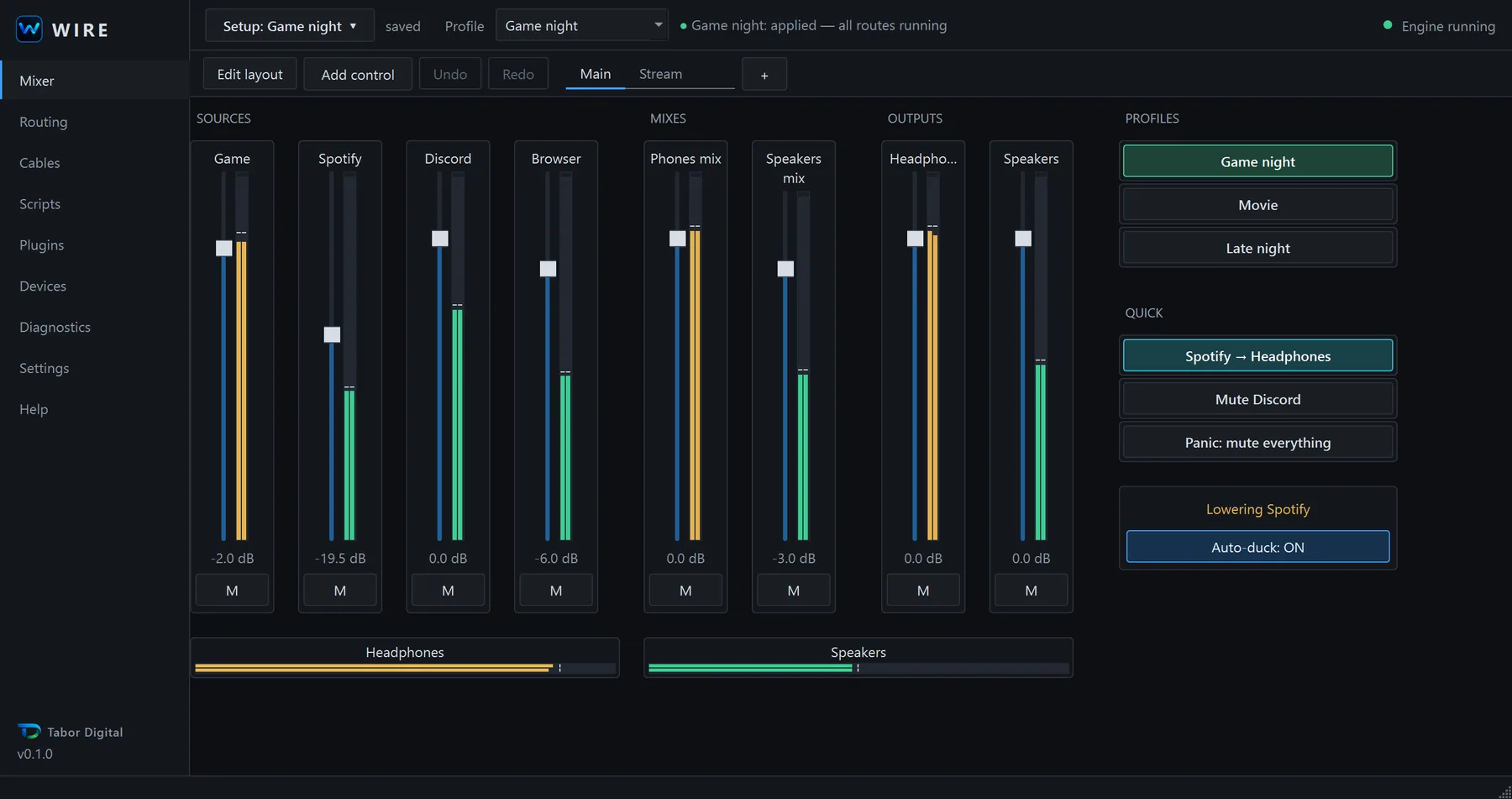
The WIRE mixer page with four source faders (Game, Spotify, Discord, Browser), two mix faders, two output faders, profile buttons and live level meters.

What it does

WIRE sends audio from many sources to many outputs at the same time. Your microphone, a game, music, a browser and a chat app can each go to the headphones, the speakers, or both.

It is a single WIRE.exe. There is no installer to run. Everything you set up is saved in one setup file that you can copy to another PC.

How it works

Every screenshot on this page is the real application.

A mixer you build yourself

The mixer page starts empty. You add faders, buttons, meters and labels, then place them where you want them.

Use more than one page, undo and redo your changes, and keep the whole layout in a single setup file.

  • Profiles such as Gaming, Movie and Late night switch a whole setup with one click.
  • Setup files (*.wiresetup) can be shared by copying the file.
  • Meters show real levels from the audio engine.
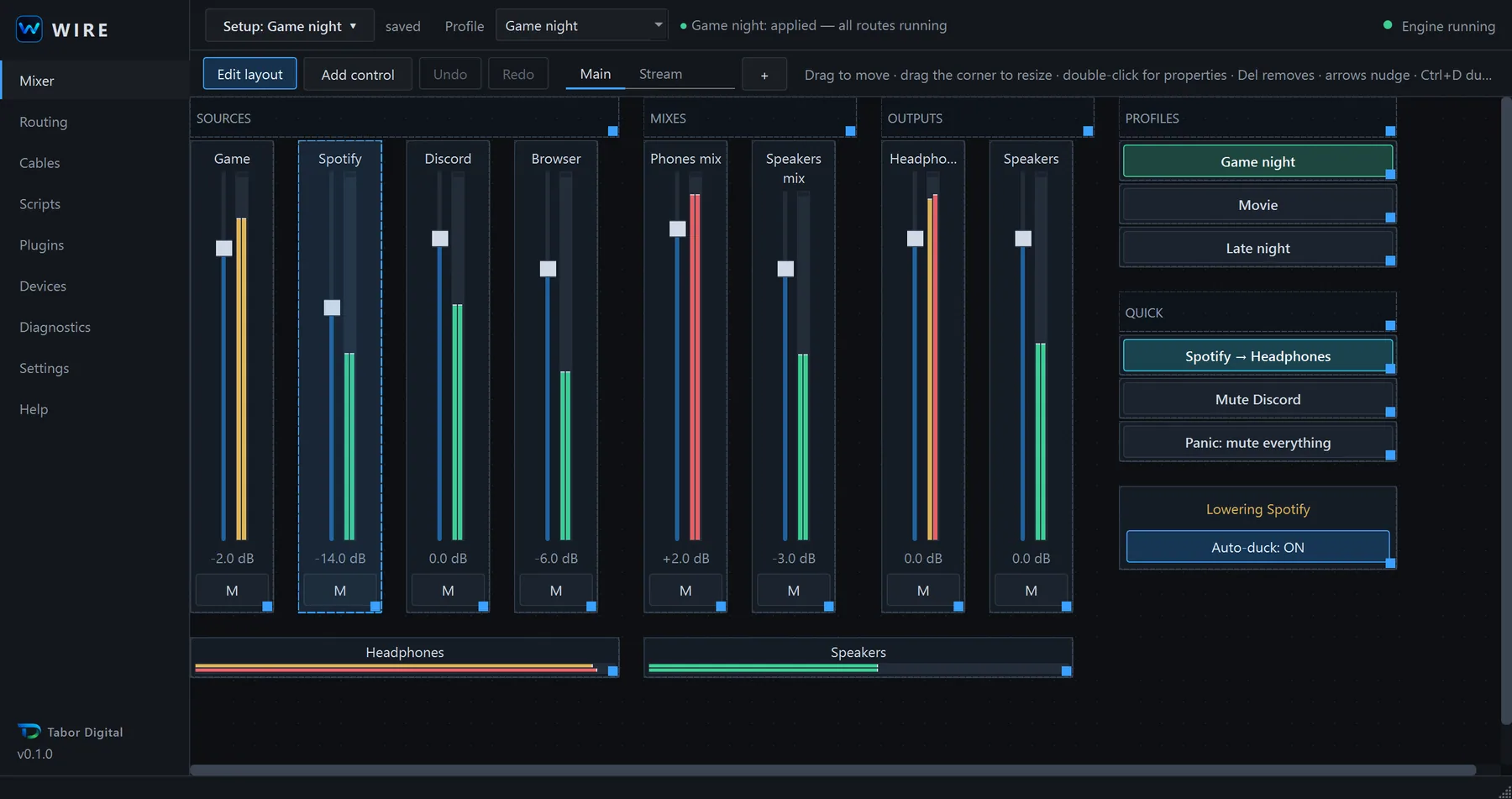
The WIRE mixer in layout edit mode. Controls have dashed outlines and resize handles, and a hint bar explains dragging, resizing and properties.

Visual routing

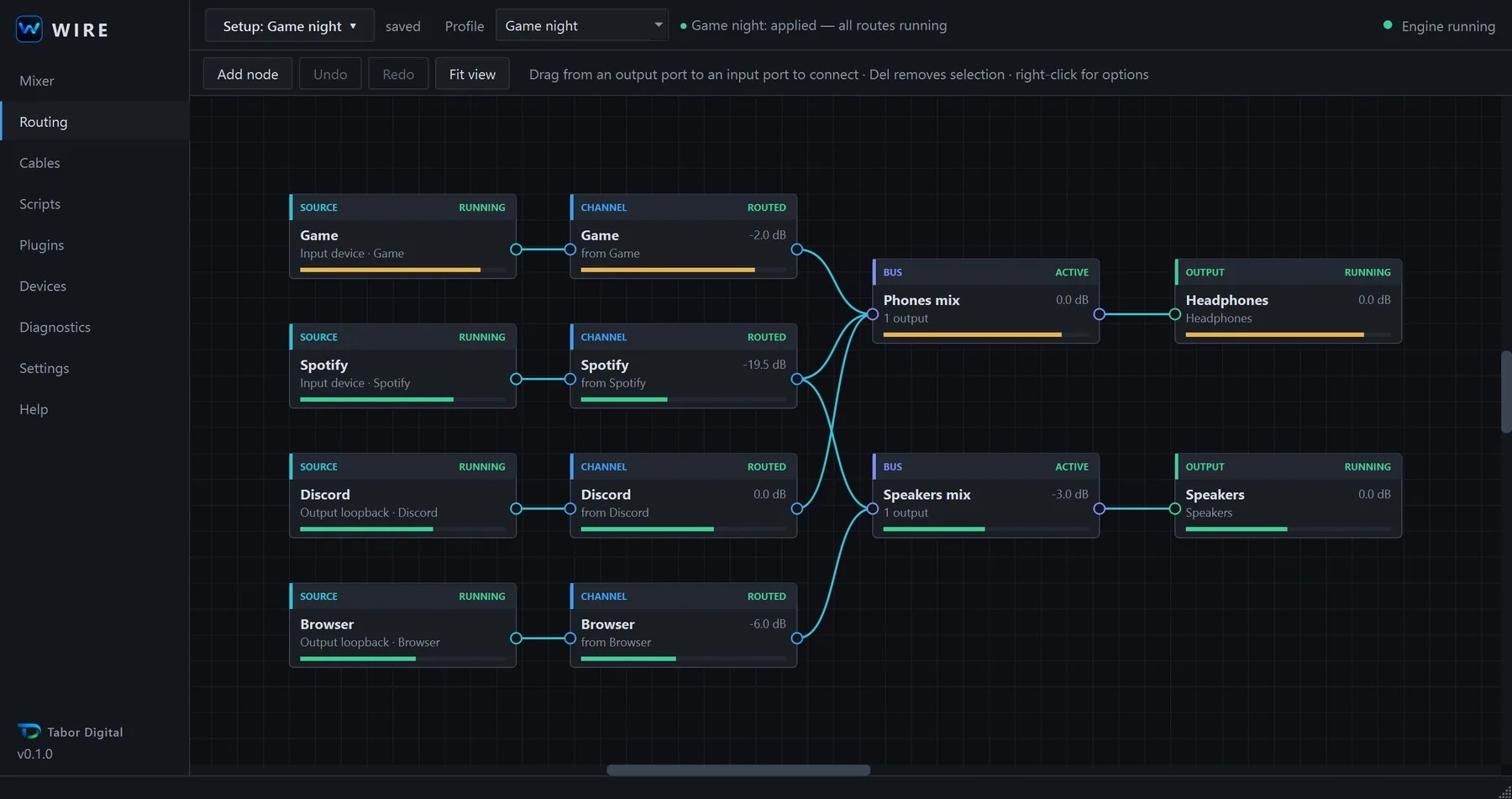
The routing page is a node graph. Drag from an output port to an input port to connect them.

A line lights up only when the audio engine confirms that audio is flowing through it. A lit line means sound, not just a connection that exists on paper.

The WIRE routing page. Source nodes feed channel nodes, which feed two buses (Phones mix and Speakers mix), which feed the Headphones and Speakers outputs. Connected lines are lit.

Routing and audio nodes

Build the signal path from small nodes. Each one does a single job.

  • MergeCombine several inputs into one.
  • SwitcherSend music to headphones or speakers with one button.
  • SelectorPick one of several inputs.
  • Stereo split and joinSeparate or combine left and right channels.
  • MonoFold a stereo signal down to mono.
  • Gain and panSet level and stereo position.
  • Parametric EQSix bands.
  • CompressorEven out loud and quiet parts.
  • LimiterStop peaks from clipping.
  • Noise gateCut the signal when it falls below a level.
  • DuckerLower the music while you talk.
  • DelayDelay a signal to line it up with another.

Scripting and remote control

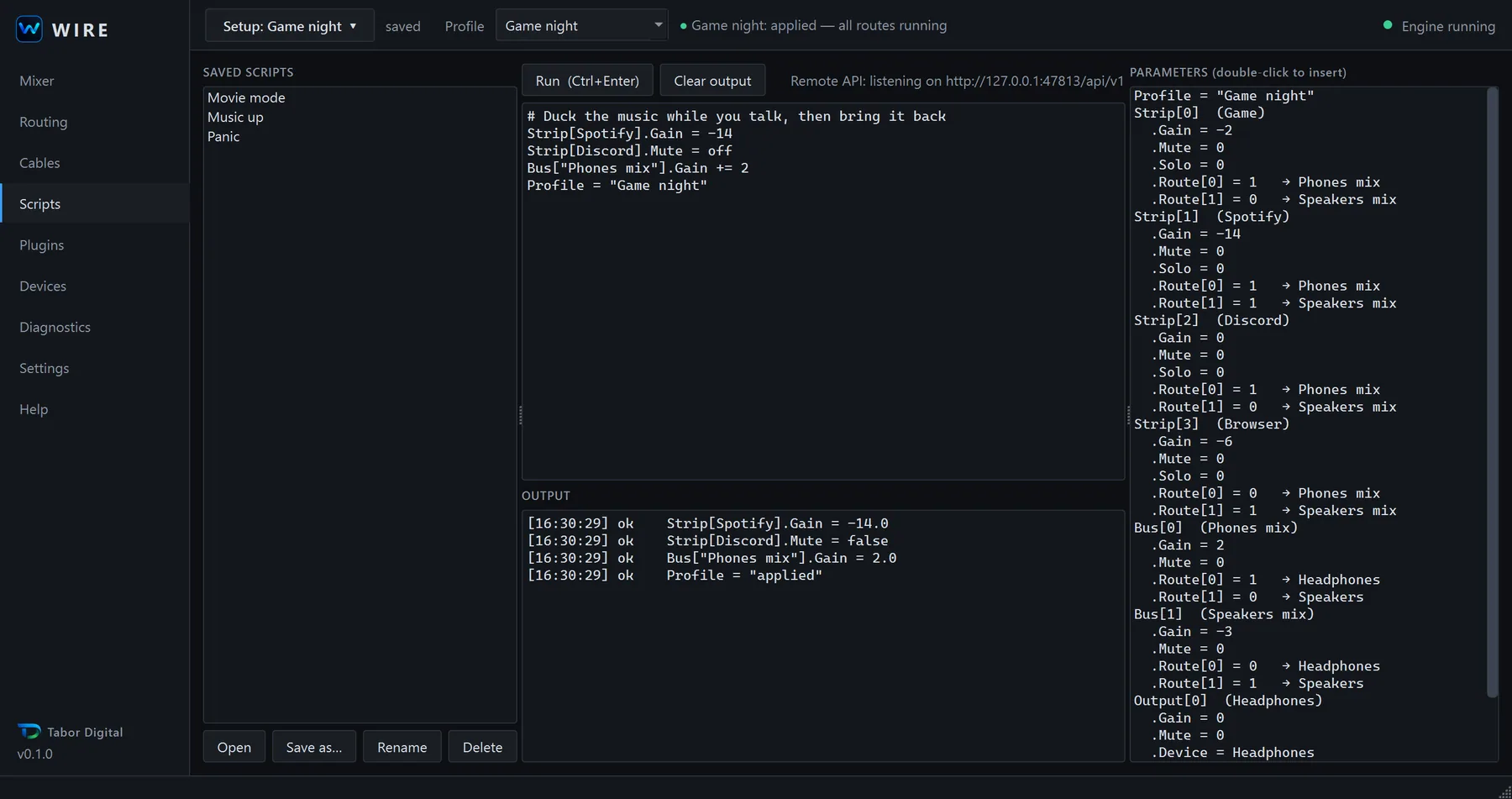
WIRE has a small script language, in the same spirit as the Voicemeeter Remote API. Scripts change gain, mute, routes, buses and profiles.

For other programs there is a local HTTP API that listens only on 127.0.0.1 and requires a token. A command-line tool and a Python client are included.

WIRE script
# Duck the music while you talk, then bring it back
Strip[Spotify].Gain = -14
Strip[Discord].Mute = off
Bus["Phones mix"].Gain += 2
Node["Music to"].Position = next
Profile = "Game night"
The WIRE scripts page. A script editor on the left runs four lines and shows an ok result for each. A parameter list on the right shows every strip, bus and output.

Virtual cables

Virtual cables carry audio between other apps and WIRE. You name each cable for what it carries, and give it a type:

  • Input: an app plays into WIRE.
  • Output: WIRE plays to an app, for example as the microphone in Discord.
  • BiWIRE: open on both sides.

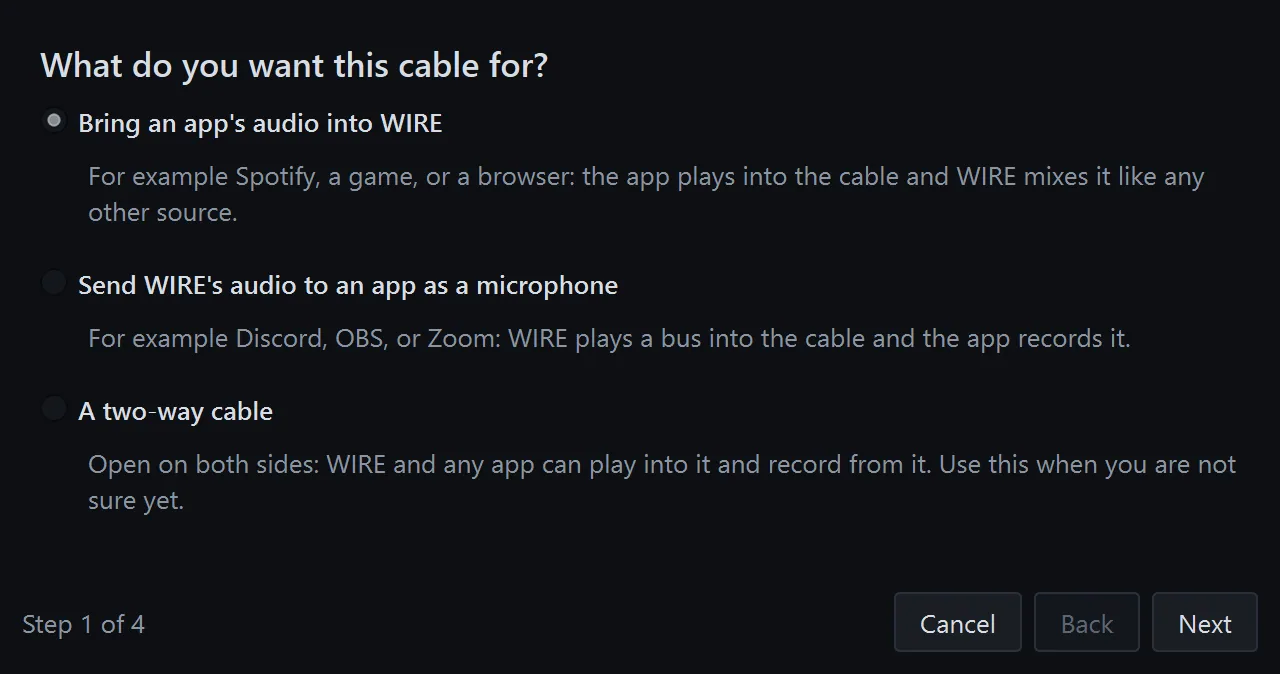
A guided wizard shows how to set up each type. Virtual cables need Virtual Audio Cable, a separate product. See What you need.

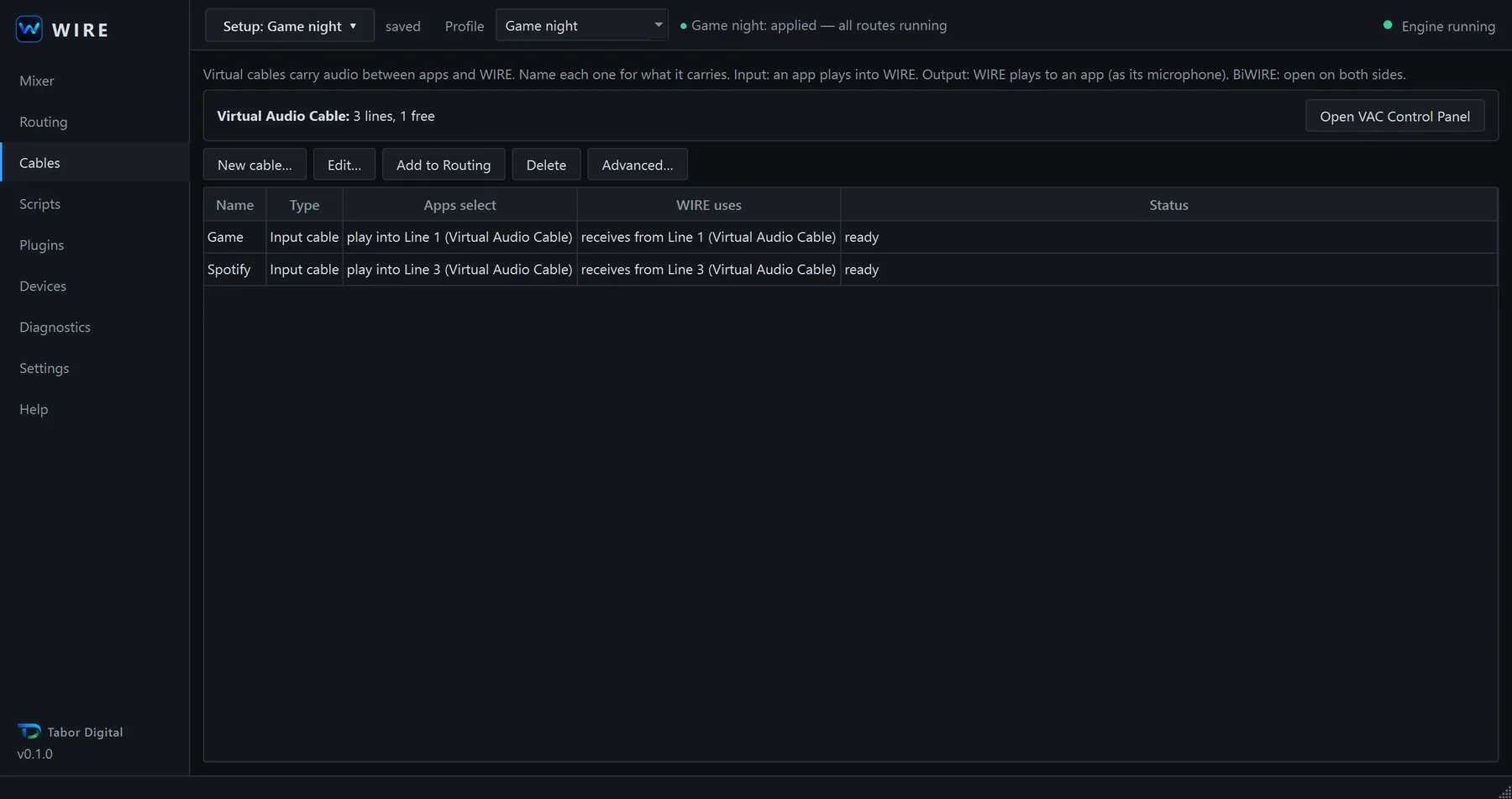
The WIRE cables page listing two Input cables, Game and Spotify, with their Virtual Audio Cable lines and a ready status.
The first step of the WIRE cable wizard asking what the cable is for, with three choices: bring an app's audio into WIRE, send WIRE's audio to an app as a microphone, or a two-way cable.

Python plugins

Plugins add controls, pages and script parameters. They are written in Python and are all disabled by default.

One example plugin, auto-duck, is included. It lowers one strip while another is active, then restores it.

Plugins run inside WIRE with your Windows user's permissions. Enable only plugins you trust.

The WIRE plugins page showing the Auto-duck plugin, version 1.0.0, enabled and running.
The auto-duck control on the mixer, showing Lowering Spotify and an Auto-duck: ON button.

Under the hood

Native audio engine

The engine is written in C++ on WASAPI. It corrects clock drift between devices and applies changes without clicks.

One file

WIRE is a single standalone WIRE.exe. You do not need an installer to run it.

Plain-language errors

When something fails, WIRE says why. For example, it tells you when another app holds a device exclusively.

Local only

The only network address WIRE uses is its own API on 127.0.0.1. It sends no telemetry.

What you need

Required

  • Windows 10 or Windows 11, 64-bit (x64).
  • At least one audio input or output device.

Virtual Audio Cable (optional)

WIRE routes audio between devices on its own. You only need Virtual Audio Cable (VAC) when you want virtual cables, for example to bring an app's audio into WIRE or to send WIRE's audio to Discord as a microphone.

VAC is a separate product by Eugene Muzychenko. You install it yourself. WIRE does not include it or redistribute it, and Tabor Digital is not affiliated with its author.

According to the VAC download page at the time of writing, VAC comes as a feature-limited Lite version for private home use, a trial version that plays a spoken reminder after 30 minutes, and a full version priced at 15 to 50 USD. Check the official page for current terms before you install.

Official VAC download page

Honest status

WIRE is version 0.1.0. This is where it stands.

Works today

  • Routing and mixing between devices, many inputs to many outputs.
  • Visual routing graph and a mixer you build yourself.
  • Routing and audio nodes, including EQ, compressor, limiter, gate, ducker and delay.
  • Scripts, a local API with a token, a command-line tool and a Python client.
  • Python plugins, disabled by default.
  • Profiles and shareable setup files.
  • Named, typed virtual cables through Virtual Audio Cable.

Planned, not built yet

  • Capturing audio per application, without virtual cables.
  • A signed installer and a code-signed exe.
  • Its own virtual audio driver.

Planned items are plans, not promises. There are no dates.

Questions

Is WIRE free?

Yes. WIRE is free to download and use. Virtual Audio Cable, which you need only for virtual cables, is a separate product with its own licence and price.

Why does Windows show a SmartScreen warning?

WIRE.exe is not code-signed yet. Windows SmartScreen warns about files that are unsigned or that it has not seen often. To run it, choose More info, then Run anyway. You can first check that the file is the one we published by comparing its SHA-256 hash. The download page explains how.

Does WIRE replace Voicemeeter?

It covers similar ground: routing and mixing audio on Windows, with scripting and a remote API. WIRE is version 0.1.0 and is much younger. It has no per-application capture, no MIDI or hardware controller support, and no recorder. Try it next to your current setup before you move anything.

Can I run WIRE alongside Voicemeeter?

Yes, with one known issue. If Voicemeeter holds a device in exclusive mode, WIRE cannot open that device. Fix it in Voicemeeter's device settings by turning off exclusive access for that device.

Where are my settings stored?

In your Windows AppData folder [TODO: owner supplies the exact subfolder name]. Your mixer layout, routing and profiles are saved in a setup file (*.wiresetup), which you can copy to another PC.

Does WIRE need administrator rights?

No. WIRE runs without administrator rights. Installing Virtual Audio Cable is different: it installs a Windows audio driver, which normally asks for administrator permission. That is VAC's installer, not WIRE.

How do I uninstall WIRE?

Close WIRE, then delete WIRE.exe and its settings folder in AppData. Nothing else is installed. If you installed Virtual Audio Cable, remove it separately with its own uninstaller.

More help: troubleshooting and support.

Get WIRE

Free. Windows 10 or 11, x64. The download page shows the SHA-256 hash so you can check the file.